Hey there, thanks for stopping by my corner of the web. If you’re here, chances are you’re in the market for a cardboard box printer—probably for your small business, maybe you’re scaling up, or you’ve been dealing with wonky, slow printing that’s killing your packaging workflow. I get it. I’ve been in the game as a cardboard box printer supplier for years, and one of the most common questions I field is this: “What’s the actual difference between direct-to-box (DTB) and transfer-printing cardboard box printers?” A lot of sales guys will throw around jargon to confuse you, so let’s cut through the noise—no fancy terms, just real talk from someone who’s watched these machines work (and fail) for hundreds of our customers. Cardboard Box Printer
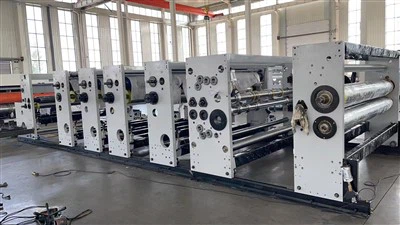
First, let’s get a quick, no-jargon breakdown of each, because if you don’t know the basics, the differences won’t land. Transfer printing (sometimes called offset transfer, or even pad transfer for smaller runs, but let’s stick to cardboard boxes) is the old workhorse of packaging printing. Think back to when you ordered custom product boxes a few years ago—you’d send your art to a printer, they’d make these big, thin plates, run ink over them, press them onto a rubber or silicone mat, then transfer that ink to the cardboard box. That’s the transfer process. Direct-to-box? That’s the newer setup, where the printer fires ink straight onto the cardboard, no middleman plate or mat. It’s like how your inkjet printer works at home, but way bigger and built to handle rough, corrugated cardboard instead of printer paper.
Now, let’s dive into the actual differences—ones that matter to you, not just the specs on a spec sheet. The first big one is run size. Transfer printing is king for large, consistent runs. Like, if you need 100,000 of the same cereal box for a national grocery brand, transfer is where it’s at. Why? The setup time is a bit of a pain, but once you lock in those plates, the speed is insane—these machines can crank out thousands of boxes an hour, no problem. And the per-unit cost drops so hard with big runs that it’s almost unbeatable for volumes above, say, 5,000 or 10,000 units. But if you only need 500 custom shipping boxes for your new Etsy shop, or 2,000 different boxes for a pop-up event? Transfer is garbage for that. Setup time alone could take 3 or 4 hours, and you’ll be paying for all those unused plates, because transfer printers charge per plate, and you have to buy a new plate every time your art changes. No thanks.
That’s where direct-to-box shines, and let’s be real—most small to mid-sized businesses I work with don’t need 100k boxes at a time. DTB printers have almost no setup. You upload your art file straight to the machine, hit print, and you’re good to go in like 15 minutes max. Change designs? Done in 2 minutes. That makes DTB perfect for short runs, variable data, or any time you want to test a new packaging design without wasting thousands on plates you’ll never use. For runs under 5,000 units, DTB is usually cheaper, full stop. Even if you’re in the 5,000 to 10,000 range, it’s often a toss-up, but I’ve seen small e-commerce brands save 30-40% on their first reorder just switching from transfer. The only catch? DTB speed tops out around 1,000 to 1,500 boxes an hour—way slower than transfer, so if you’re racing to fill a huge order, DTB might not cut it.
Next up: print quality and finish. This is where a lot of people get hoodwinked. Transfer printing is known for super crisp, vibrant colors, right? But hold on—those vibrant colors are only on the surface, and they tend to look flat on corrugated cardboard. Plus, transfer ink sits on top of the box, so if you’re stacking boxes roughly, or they get banged around in shipping, that ink can scuff or rub off. We had a customer last year who used a transfer-printed box for their skincare line, and when it got to a wholesaler, half the boxes had faded logos from being stacked in a truck. They lost a big order over that. DTB? The ink is absorbed into the cardboard, so it’s way more scratch-resistant. It also doesn’t smudge if your boxes get a little damp (not totally waterproof, but way better than transfer). And wait—DTB doesn’t have to be less vibrant anymore. Newer DTB printers use high-density, UV-cured inks that look almost identical to transfer. The only time transfer beats DTB on color is if you’re doing super-specific spot colors, like a Pantone shade for a luxury brand logo, but even then, DTB can match most of those now.
Then there’s flexibility and customization. Let’s say you sell t-shirts and want each box to have a unique design—like, for different sizes, or customer names, or limited-edition prints for holidays. That’s impossible with transfer, because every design needs a new plate. With DTB, you can print 100 boxes, each with a different QR code, a different customer’s name, or a totally different design. We had a craft brewery client last year who used DTB to print 500 unique boxes for their anniversary release, each with a different line of text celebrating a year of their beers. They couldn’t have done that with transfer, period. Also, DTB works on any kind of cardboard—regular corrugated, thick Kraft, even recycled cardboard. Transfer works, but you have to adjust the mat and plates every time you switch cardboard type, which adds more setup time. DTB is just plug and play for most cardboard types.
Cost breakdown, because this is what everyone cares about. Let’s be real: both have upfront costs, but it’s totally different. A used transfer printer can run you around $15,000 to $30,000, and a new one is $50,000 and up. But then there are the hidden costs: plates, which can be $500 to $2,000 each, and you have to store them, or pay a printer to make them every time. Ink for transfer is cheap per unit, but when you’re paying for unused plates, it adds up fast. DTB printers? New ones start around $10,000 for a small, entry-level model that works great for 1,000 boxes a month, and go up to $40,000 for a high-volume one that can do 10,000 a month. The ink is a bit more expensive per box, but there are no plates, no setup fees for design changes, and almost no hidden costs. For small businesses, entry-level DTB is usually cheaper to get started, and for medium businesses, it’s a wash for runs up to 10k. Transfer only makes sense if you’re doing consistent runs of 10k+ boxes, and you have the budget for the upfront machine and plates.
Wait, I should also talk about maintenance, because that’s a huge part of owning a printer that no one mentions. Transfer printers have a lot of moving parts—plates, mats, rollers, presses. They need regular cleaning, calibration, and parts replacement. We had a customer with a transfer printer who spent $2,000 a year on maintenance, just to keep the plates from warping and the mats from cracking. DTB printers? They have fewer moving parts, mostly print heads and ink reservoirs. Maintenance is way simpler—just clean the print heads every few months, replace ink when it runs out, and that’s it. Most of our DTB customers spend less than $500 a year on upkeep. That’s a big difference over 5 years.
But hold on, I’m not here to say one is 100% better than the other—they’re built for different needs. Let’s wrap up with who should pick what, because that’s what you’re actually here for. If you’re a large-scale manufacturer, or you need consistent runs of 10k+ identical boxes, transfer is the way to go. It’s faster, cheaper per unit for big volumes, and the color quality is still unbeatable for super-specific Pantone shades. But if you’re a small business, e-commerce brand, craftsperson, or anyone who does short runs (under 5k), changes designs often, needs variable data, or just doesn’t want to deal with the hassle of plates and setup? DTB is 100% the better pick.
At the end of the day, the best printer isn’t the fanciest one—it’s the one that fits your workflow and your budget. I’ve worked with customers who spent $30k on a transfer printer for a run of 20k boxes, and ended up throwing half the machine away because they never used it for a big enough run. And I’ve had a coffee roaster client with a $12k DTB printer who’s been running 500-1,000 boxes a month for 3 years, and it’s never let them down.

If you’re still trying to figure out which one makes sense for your business, or you want to chat about specific models, run sizes, or budgets, I’m here to help. No sales pitch, no pressure—just honest answers from someone who’s been in this space for years. If you want to connect for a quick, no-obligation chat about your cardboard box printing needs, reach out anytime.
Corrugated Box Machinery References
- Packaging Digest. (2022). "Direct-to-Box vs. Transfer Printing: Key Differences for Packaging Manufacturers."
- Smith, J. (2023). "Corrugated Printing Technologies: Cost, Speed, and Quality Benchmarks for Small to Mid-Run Operations."
- Flexo Tech International. (2021). "Transfer Printing vs. Digital Printing for Corrugated: A Practical Comparison for E-Commerce Brands."
- National Federation of Independent Business. (2022). "Cost-Benefit Analysis of Packaging Printing Equipment for Small Businesses."
Guangzhou HS Machinery Co., Ltd.
We’re well-known as one of the leading cardboard box printer manufacturers and suppliers in China. Please feel free to buy cheap cardboard box printer for sale here from our factory. Quality products and low price are available.
Address: Xiaowu 1st Industrial Area, Xiaowu Village, Dongchong Town, Nansha, Guangzhou, China
E-mail: vipmachinery@126.com
WebSite: https://www.cartonboxsolutions.com/
